Optimizing tick time in Minecraft
.png)
Most of the time, when we use certain plugins, we start seeing the TPS drop, the server freeze, or lag show up on the client side.
When I first started making Minecraft plugins, the tick loop wasn’t something I really needed. The code I wrote usually didn’t run inside the tick loop — it was mostly command-based stuff. But once I started building minigames and things like that, I realized something: optimizing tick time was a nightmare. I just couldn’t do it properly. Sure, the plugin I wrote worked “well enough,” but I always felt like you’d be better off writing this in another language. The thing is, tick time follows a simple, almost arithmetic line. Once you see that line and write your code with it in mind, you end up getting way better performance than you expected. That’s what this post is about.
What does 20 TPS actually mean?
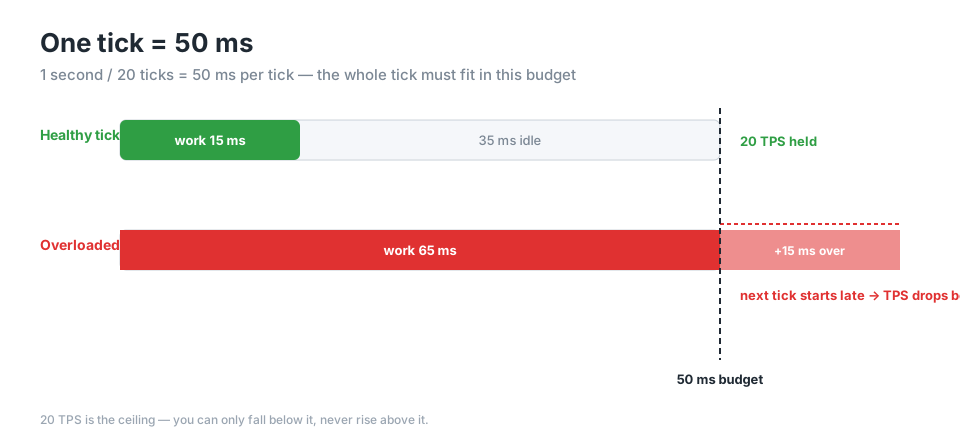
A Minecraft server updates the game world at fixed intervals. Each of these updates is called a tick, and the server is designed to run 20 ticks per second. The number you get from that is the one sitting at the center of every performance conversation:
1 second / 20 ticks = 50 milliseconds / tickSo everything the server has to do in a single tick — world physics, entity AI, redstone, mob spawning, and all the code your plugins run — has to fit inside those 50 milliseconds.
What happens if it doesn’t fit? The server delays the next tick. As ticks start late, you can’t hit 20 per second anymore, and the TPS drops. 20 TPS is your ceiling; you can never go above 20, only below it. That’s why there’s no such thing as “raising your TPS” — there’s only protecting the 20 you have.
And when TPS drops, this is exactly what players feel: mobs move in stutters, breaking blocks lags, commands respond late. Because everything actively moving inside the game either slows down or feels untouchable. You try to break a block and you can’t — or you do break it, but the result reaches you late. Or you break 10 blocks and the server rolls you back as if you only broke 5.
The main thread in a plugin
Here’s the most important thing I was missing back then: the whole tick loop runs on a single thread. The main thread is the heart of the server, and almost everything related to the world is handled here — in order, one at a time.
This has a direct result: code running on the main thread makes the rest of the tick wait until that work is done. If your code takes 5 milliseconds, the tick has 45 milliseconds left. If your code takes 60 milliseconds, that single tick has already blown past the budget on its own, and the server visibly stutters.
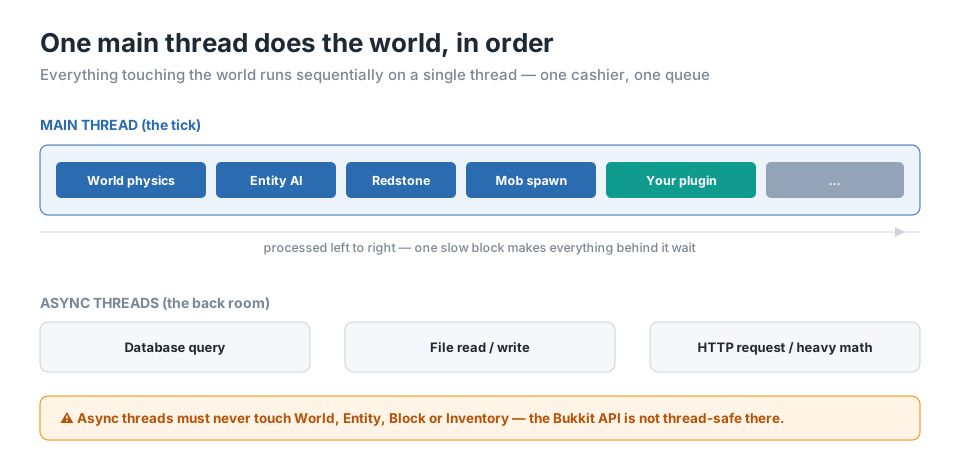
Here’s a way to picture it: the main thread is a shop with only one cashier. Everyone lines up in the same queue. If someone sits at the register and counts the loose coins in their bag one by one, everyone behind them waits. Async threads, on the other hand, are the workers in the back storage room — they don’t tie up the register, but they also can’t touch it (the world).
The anatomy of blocking a tick
The work that blocks the main thread usually comes from situations like these:
- Disk I/O — reading a config file every tick, writing player data to a file.
- Database queries — a synchronous SQL query freezes the main thread right where it stands until the answer comes back.
- Network requests — sending a synchronous request to an HTTP API (if the remote server is slow, your server is slow too).
- Scaling loops — scans that grow as the player count grows, or even grow multiplicatively, like players × entities.
What all of these have in common is that their duration isn’t fixed. Code that runs fine with 10 players can bring the server to its knees with 100. The code is the same code; the only thing that changed is the load landing on the tick budget.
Don’t write schedulers that run every tick
This is maybe the most classic source of plugin performance problems. You set up a BukkitRunnable, you set its period to 1L (every tick) without thinking too hard about it, and then you drop an innocent-looking job inside it, like “find the entities around each player.”
new BukkitRunnable() {
    public void run() {
        for (Player p : Bukkit.getOnlinePlayers()) {
            for (Entity e : p.getWorld().getEntities()) { // every entity in the world
                if (e.getLocation().distance(p.getLocation()) < 10) {
                    // ...
                }
            }
        }
    }
}.runTaskTimer(plugin, 0L, 1L); // every tick!
Let’s talk about what this code costs. getEntities() hands you every entity in the world — dropped items, mobs, experience orbs, all of it. Say there are 2000 entities and 50 players. Every tick you’re doing 50 × 2000 = 100,000 iterations.
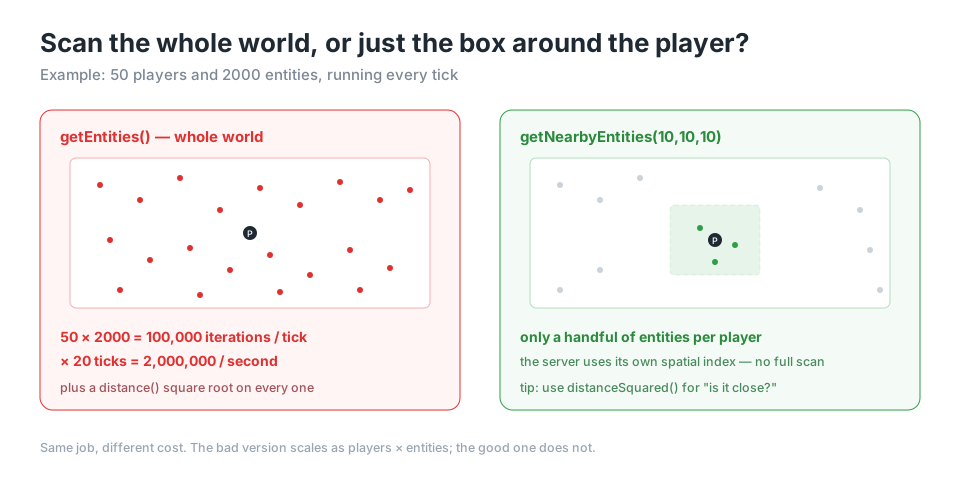
Since there are 20 ticks per second, that’s 2 million iterations per second. And on each one you’re calling distance() — which involves a square root, so while your server (or your computer) is basically on fire in front of you, you could grill a barbecue on top of it.
We can fix this in two moves:
new BukkitRunnable() {
    public void run() {
        for (Player p : Bukkit.getOnlinePlayers()) {
            Collection<Entity> nearby =
                p.getWorld().getNearbyEntities(p.getLocation(), 10, 10, 10);
            for (Entity e : nearby) {
                // ...
            }
        }
    }
}.runTaskTimer(plugin, 0L, 5L); // 4 times per second
Two things happened here. First, instead of getEntities() we used getNearbyEntities(...): now we’re not scanning the whole world, just the 10-block box around the player. The server solves this efficiently with its internal spatial structure, and we save ourselves millions of pointless comparisons. Second, we pulled the period from 1L to 5L. You should ask yourself: does this task really need to run 20 times per second, or will 4 times go unnoticed?
One small but valuable note about the distance check: if all you want is a “is it close?” answer, use distanceSquared() instead of distance() and compare against the squared threshold. distance() takes a square root; distanceSquared() doesn’t. On a hot path, you’ll feel that difference.
Async: only half the story
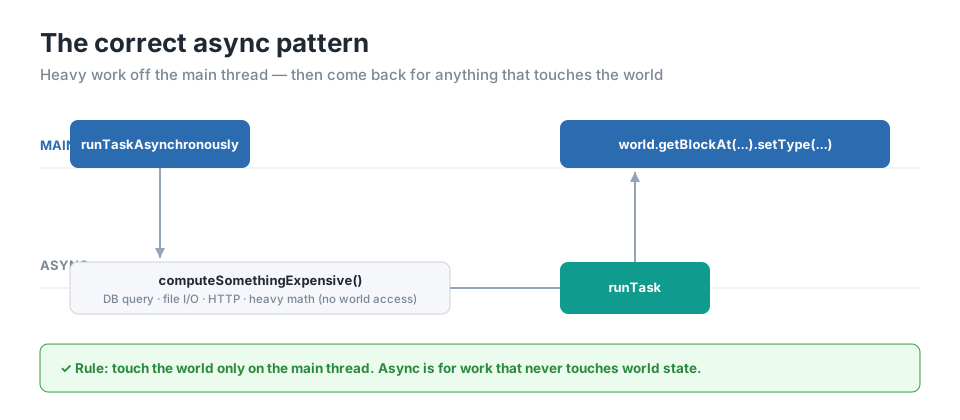
“Then I’ll just throw the heavy work onto async and let the main thread relax” — right instinct, but half of it is missing. Because most of the Bukkit/Paper API is not thread-safe. You can only safely touch objects like World, Entity, Block, and Inventory from the main thread. Touching the world from an async thread means, best case, unexpected behavior, and worst case, a server crash or a corrupted saved world.
This code is asking for a crash:
Bukkit.getScheduler().runTaskAsynchronously(plugin, () -> {
    player.getWorld().getBlockAt(x, y, z).setType(Material.STONE); // off the main thread
});
The correct pattern is this: do the heavy work that doesn’t touch the world on async, then carry the result back to the main thread.
Bukkit.getScheduler().runTaskAsynchronously(plugin, () -> {
    Result heavy = computeSomethingExpensive(); // DB, file, etc.
    Bukkit.getScheduler().runTask(plugin, () -> {
        player.getWorld().getBlockAt(x, y, z).setType(Material.STONE);
    });
});
Async is for work that doesn’t touch world state — database queries, HTTP requests, reading/writing files, heavy math. The moment you’re about to touch the world, you come back to the main thread with runTask.
The one exception is Paper’s special async APIs that are intentionally designed to be thread-safe (like World.getChunkAtAsync). Rather than trying to fake these with reflection, using them as-is is both safer and more correct.
Loading chunks synchronously
Another classic that quietly eats your tick budget is force-loading a chunk without realizing it.
Block b = world.getBlockAt(x, y, z);If the chunk that coordinate lives in isn’t loaded, this call loads it synchronously, blocking the main thread. Generating or reading a chunk from disk isn’t cheap; code that does bulk block work in regions far from players can accidentally force-load dozens of chunks and freeze the server in a single tick. Checking whether it’s loaded first, and loading it async when needed, saves us from that weight:
if (world.isChunkLoaded(x >> 4, z >> 4)) {
    Block b = world.getBlockAt(x, y, z);
} else {
    world.getChunkAtAsync(x >> 4, z >> 4, chunk -> {
        // work after the chunk is loaded
    });
}
A note on Folia
The “single main thread” model in this post app
lies to traditional Paper/Spigot. Paper’s Folia branch changes this model completely: it splits the world into regions and ticks each region on its own thread. So the “one cashier” metaphor turns into “one cashier per neighborhood” on Folia.
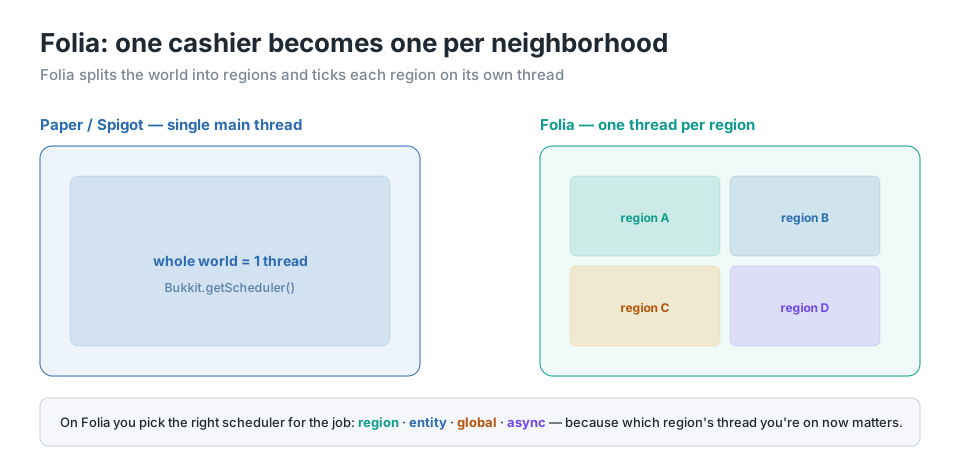
What this means in practice: on Folia, instead of Bukkit.getScheduler(), you move to a split between region, entity, and global schedulers, because now it matters which region’s thread you’re running on. If you’re not targeting Folia, everything in this post applies as-is; if you are, keep in mind that the tick model becomes plural.
Don’t optimize without measuring
After reading this far, if you’re writing a big plugin, I’d rather you go take a look at what you’ve written. But one warning: don’t assume the bottleneck is where you think it is. In performance optimization, the most wasted time is time spent prettifying code that wasn’t slow in the first place.
Measure first. Paper’s /timings report, and especially the Spark profiler, show you where the tick time actually goes. Spark tells you which method is eating what percent of the tick budget — and the result will almost always move in proportion to the changes you make. Be skeptical of miracle claims like “this one line doubles your TPS,” too; real gains come from targeting a measured bottleneck, not from random micro-optimization.
Sources & further reading
- Paper — Scheduling (main thread vs async, thread safety): https://docs.papermc.io/paper/dev/scheduler/
- Paper — Supporting Paper and Folia (region / entity / async / global schedulers): https://docs.papermc.io/paper/dev/folia-support/
- BukkitScheduler Javadoc (“Asynchronous tasks should never access any API in Bukkit”): https://jd.papermc.io/paper/org/bukkit/scheduler/BukkitScheduler.html
- Spark profiler (official site & online viewer): https://spark.lucko.me/
- Spark documentation: https://spark.lucko.me/docs
- Cover Image: https://wallhaven.cc/w/lmlxwy

-1.jpg)