
BasisEra
PublicMINECRAFT PLUGINBasisERA
A modern, asynchronous, modular essentials suite for Paper 1.21+ / Java 21 — a clean-room alternative to EssentialsX built around three principles: zero main-thread I/O, **truly lazy modules**, and modern APIs only (Adventure/MiniMessage, Brigadier, Folia-ready).
Highlights
- Async everything — all persistence runs on a dedicated pool via HikariCP and returns
CompletableFuture. The server thread never touches the database or disk. - Async teleports —
getChunkAtAsync→ safety check →teleportAsync, so teleporting never forces a synchronous chunk load. - Truly lazy modules — a module disabled in
config.ymlis never class-loaded: no listeners, no commands, no cost. - Exact economy — fixed-point money (no floating point), an indexed
/baltop, and a full transaction log. - Per-player i18n — MiniMessage messages, chosen automatically from each player’s client locale. Seven languages ship in the box (English, Turkish, Spanish, German, French, Russian, Chinese), with automatic key top-up on upgrade.
- Folia-ready — region/entity scheduler abstractions, no shared mutable state.
- Any storage, zero setup — SQLite by default (nothing to install), or MySQL / MariaDB for networks. All three JDBC drivers are bundled, and on MySQL/MariaDB the database is created automatically.
- Network-aware — persisted state (bans, mutes, jails, vanish, economy, homes…) follows a player across a proxy when the backends share one database, and staff chat can span the whole network — no Redis required.
- Staff tooling — vanish, freeze, staff mode, staff chat, reports, punishment history, chat filter, alt-account detection.
- Optional integrations — registers as a Vault economy provider and ships a PlaceholderAPI expansion when those plugins are present (neither is bundled).
Command reference
Every module can be switched off in config.yml under modules: — a disabled module’s commands
disappear entirely. <required> arguments are mandatory, [optional] ones are not. Names, warps,
homes, kits and players all tab-complete.
Core — always on
| Command | Permission | What it does |
|---|---|---|
/basisera |
basisera.admin |
Shows the admin command’s usage. Alias: /bera. |
/basisera reload |
basisera.admin.reload |
Re-reads config.yml and the language files, and refreshes every active module. Does not enable or disable modules — that needs a full server restart. |
/basisera version |
basisera.admin |
Prints the running version. |
utility
| Command | Permission | What it does |
|---|---|---|
/heal |
basisera.utility.heal |
Restores your health and hunger and puts out any fire. |
/feed |
basisera.utility.feed |
Refills hunger and saturation only. |
/fly |
basisera.utility.fly |
Toggles flight for yourself. |
/god |
basisera.utility.god |
Toggles damage immunity. Also stops hunger from draining. |
/gamemode <mode> [player] |
basisera.utility.gamemode…gamemode.others |
Changes game mode. Accepts survival/creative/adventure/spectator, their first letters (s/c/a/sp) or 0-3. The [player] form needs the .others permission. |
/gmc /gms /gma /gmsp/gm1 /gm0 /gm2 /gm3 |
basisera.utility.gamemode |
Shortcuts that set your own mode. Letters and numbers both work: creative (/gmc, /gm1), survival (/gms, /gm0), adventure (/gma, /gm2), spectator (/gmsp, /gm3). |
/speed <0-10> [walk / fly] |
basisera.utility.speed |
Sets movement speed. With no type it picks fly speed if you’re flying, otherwise walk speed. |
/msg <player> <message> |
basisera.utility.msg |
Sends a private message. Blocked if the recipient ignores you (unless you have the ignore bypass) or if you’re muted. |
/reply <message> |
basisera.utility.msg |
Replies to whoever you last messaged, or who last messaged you. |
/ignore <player> |
basisera.utility.ignore |
Stops that player messaging you. Persists across restarts. |
/unignore <player> |
basisera.utility.ignore |
Lifts an ignore. |
/ignores |
basisera.utility.ignore |
Lists everyone you’re ignoring. |
/socialspy |
basisera.utility.socialspy |
Toggles seeing other players’ private messages. Resets when you log out. |
/invsee <player> |
basisera.utility.invsee |
Opens another player’s inventory. |
/enderchest |
basisera.utility.enderchest |
Opens your ender chest anywhere. |
/workbench |
basisera.utility.workbench |
Opens a crafting table anywhere. |
/anvil |
basisera.utility.anvil |
Opens an anvil anywhere. |
/grindstone |
basisera.utility.grindstone |
Opens a grindstone anywhere. |
/repair |
basisera.utility.repair |
Fully repairs the item in your main hand. |
/more |
basisera.utility.more |
Fills the held stack to its maximum size. |
/hat |
basisera.utility.hat |
Wears the held item as a helmet, swapping out whatever you had on. |
/clearinventory [player] |
basisera.utility.clearinventory…clearinventory.others |
Empties your inventory, or someone else’s with the .others permission. |
/top |
basisera.utility.top |
Teleports you to the highest block above you. |
/ping [player] |
basisera.utility.ping |
Shows your latency, or another player’s. |
/me <action> |
basisera.utility.me |
Broadcasts * YourName <action>. Blocked while muted. |
/broadcast <message> |
basisera.utility.broadcast |
Announces a message to everyone. Supports colours. |
/sudo <player> <command> |
basisera.utility.sudo |
Runs a command as another player, using their permissions, not yours. |
teleport
All teleports load the destination chunk asynchronously — they never freeze the server.
| Command | Permission | What it does |
|---|---|---|
/sethome [name] |
basisera.teleport.sethome |
Saves your position as a home. Omitting the name uses home. Limited by your group’s home-limit. |
/home [name] |
basisera.teleport.home |
Teleports to one of your homes. |
/homes |
basisera.teleport.home |
Lists your homes. |
/delhome [name] |
basisera.teleport.sethome |
Deletes a home. |
/setwarp <name> |
basisera.teleport.setwarp |
Creates a public warp at your position, or moves an existing one. |
/warp <name> |
basisera.teleport.warp |
Teleports to a warp. If per-warp-permission is on, also needs basisera.warp.<name>. |
/warps |
basisera.teleport.warp |
Lists the warps you’re allowed to use. |
/delwarp <name> |
basisera.teleport.setwarp |
Deletes a warp. |
/setspawn |
basisera.teleport.setspawn |
Sets the server spawn to your position. |
/spawn |
basisera.teleport.spawn |
Teleports to spawn. Falls back to the main world’s spawn if none is set. |
/tpa <player> |
basisera.teleport.tpa |
Asks a player to let you teleport to them. |
/tpahere <player> |
basisera.teleport.tpa |
Asks a player to teleport to you. |
/tpaccept |
basisera.teleport.tpa |
Accepts the pending request. Requests expire after request-timeout-seconds. |
/tpdeny |
basisera.teleport.tpa |
Rejects the pending request. |
/back |
basisera.teleport.back |
Returns you to where you were before your last teleport — or to where you died. |
/rtp |
basisera.teleport.rtp |
Teleports you to a random safe spot within rtp.radius of spawn. |
/tp <player> |
basisera.teleport.tp |
Teleports you to a player, with no warmup or cooldown. |
/tp <x> <y> <z> |
basisera.teleport.tp |
Teleports you to coordinates in your current world. |
/tp <player> <target> |
basisera.teleport.tp.others |
Teleports one player to another. |
/tp <player> <x> <y> <z> |
basisera.teleport.tp.others |
Teleports a player to coordinates. |
/tphere <player> |
basisera.teleport.tp |
Pulls a player to you. |
/tppos <x> <y> <z> |
basisera.teleport.tppos |
Teleports you to coordinates in your current world. |
/tpall |
basisera.teleport.tpall |
Pulls every online player to you. |
Homes, warps, spawn and /rtp apply a warmup (cancelled if you move) and a cooldown, both
per group. Grant basisera.group.<name> to put a player in a config group, or
basisera.teleport.bypass.warmup / .bypass.cooldown to skip either.
economy
| Command | Permission | What it does |
|---|---|---|
/balance [player] |
basisera.economy.balance…balance.others |
Shows your balance, or someone else’s (works for offline players too). |
/pay <player> <amount> |
basisera.economy.pay |
Pays another player. Works even if they’re offline — they get told on their next join. |
/baltop |
basisera.economy.baltop |
Lists the richest players. A single indexed query, so it stays instant. |
/eco give <player> <amount> |
basisera.economy.admin |
Adds money to a player. |
/eco take <player> <amount> |
basisera.economy.admin |
Removes money, failing if they can’t cover it. |
/eco set <player> <amount> |
basisera.economy.admin |
Sets a balance outright. |
Every change is written to a transaction log. If Vault is installed, BasisERA registers itself as the economy provider so shop and job plugins work against it.
kit
| Command | Permission | What it does |
|---|---|---|
/kit <name> |
basisera.kit.use and basisera.kit.<name> |
Claims a kit. Overflow drops at your feet. |
/kits |
basisera.kit.use |
Lists only the kits you actually have access to. |
/createkit <name> [cooldown] |
basisera.kit.admin |
Saves your current inventory as a kit, with an optional cooldown in seconds. Enchantments, custom names, attributes and all other NBT survive intact. |
/delkit <name> |
basisera.kit.admin |
Deletes a kit. |
Cooldowns are per player and stored in the database, so they survive restarts.
basisera.kit.cooldown.bypass skips them.
| Command | Permission | What it does |
|---|---|---|
/mail send <player> <message> |
basisera.mail.use |
Sends mail. The recipient may be offline. |
/mail read |
basisera.mail.use |
Reads your mailbox. |
/mail clear |
basisera.mail.use |
Empties your mailbox. |
Players are told how much mail is waiting when they log in.
moderation
| Command | Permission | What it does |
|---|---|---|
/ban <player> [reason] |
basisera.mod.ban |
Permanently bans. Works on offline players. |
/tempban <player> <duration> [reason] |
basisera.mod.ban |
Bans for a while. Duration is 10m, 2h, 1d, 1w, or compound like 1d2h30m. |
/unban <player> |
basisera.mod.ban |
Lifts a ban. |
/checkban <player> |
basisera.mod.ban |
Shows why someone is banned, by whom, and when it expires. |
/kick <player> [reason] |
basisera.mod.kick |
Kicks an online player. |
/mute <player> [reason] |
basisera.mod.mute |
Silences a player permanently. |
/tempmute <player> <duration> [reason] |
basisera.mod.mute |
Silences for a while. |
/unmute <player> |
basisera.mod.mute |
Lifts a mute. |
/checkmute <player> |
basisera.mod.mute |
Shows the active mute’s reason, author and expiry. |
/shadowmute <player> [duration] [reason] |
basisera.mod.mute |
Silently mutes: the player still sees their own messages and never learns they were muted. /unmute clears it too. |
/warn <player> <reason> |
basisera.mod.warn |
Records a warning and tells the player. |
/warns <player> |
basisera.mod.warn |
Shows a player’s warning history with who issued each and when. |
/delwarns <player> |
basisera.mod.warn |
Clears a player’s warnings. |
/history <player> |
basisera.mod.history |
Shows a player’s recent punishments (bans, mutes, kicks, warns, shadow mutes) — type, reason, staff member and when. |
Bans are checked during login, before the player joins. A mute covers chat and the commands
listed in moderation.muted-blocked-commands (/msg, /me, /mail…), so it can’t be talked
around. Bans and mutes expire on their own. Every punishment is written to an append-only history
that /history reads.
jail
| Command | Permission | What it does |
|---|---|---|
/setjail <name> |
basisera.jail.admin |
Creates a jail at your position. Name it default to use it without typing a name. |
/deljail <name> |
basisera.jail.admin |
Deletes a jail. |
/jails |
basisera.jail.admin |
Lists the jails. |
/jail <player> [duration] [jail] |
basisera.jail.jail |
Jails a player. No duration means permanent; use perm explicitly when naming a jail. Offline players get jailed on their next join. |
/unjail <player> |
basisera.jail.jail |
Releases a player. |
Jailed players are held within jail.radius blocks of the jail and can’t use commands or
build. Sentences survive restarts and end on their own.
afk
| Command | Permission | What it does |
|---|---|---|
/afk [message] |
basisera.afk |
Marks you AFK, optionally with a reason. Run it again — or just move — to come back. |
Players also go AFK on their own after afk.auto-minutes of no movement, interaction, chat or
commands.
info
| Command | Permission | What it does |
|---|---|---|
/seen <player> |
basisera.info.seen |
Says when a player was last online. An indexed lookup, so it’s instant even with a huge player base. |
/list |
basisera.info.list |
Lists who’s online, marking AFK players. |
/near [radius] |
basisera.info.near |
Lists nearby players and their distance. Defaults to info.near-radius. |
/whois <player> |
basisera.info.whois |
Shows an online player’s UUID, ping, game mode, health, position and AFK state. |
/motd |
basisera.info.motd |
Shows the message of the day from info.motd. |
/rules |
basisera.info.rules |
Shows the rules from info.rules. |
nick
| Command | Permission | What it does |
|---|---|---|
/nick <name> |
basisera.nick.use |
Sets your nickname. Colours need basisera.nick.color. |
/nick off |
basisera.nick.use |
Clears your nickname. |
/nick <player> <name> |
basisera.nick.others |
Sets someone else’s nickname. |
/realname <nick> |
basisera.nick.use |
Finds the real account behind a nickname. |
vanish
| Command | Permission | What it does |
|---|---|---|
/vanish [player] |
basisera.vanishbasisera.vanish.others |
Hides you from everyone without basisera.vanish.see. Vanished players are left out of /list and /near, and their join/quit messages are suppressed. |
Vanish is persisted, so on a shared MySQL/MariaDB it follows you across a proxy — switch servers
and you stay hidden. Note that basisera.vanish.see defaults to op, so operators can see
vanished players by design — test with a non-op account.
staff
| Command | Permission | What it does |
|---|---|---|
/freeze <player> |
basisera.staff.freeze |
Freezes a suspect in place — no movement, commands, building or combat, and they take no damage. Staff are alerted if they log out while frozen. Toggle off by running it again. |
/staffmode |
basisera.staff.mode |
Toggles staff mode: flight plus vanish, in one command. |
/staffchat [message] (/sc) |
basisera.staff.chat |
With a message, sends it to the staff channel; with none, toggles routing all your chat there. Seen by anyone with basisera.staff. |
/staffchatall [message] (/sca) |
basisera.staff.chat |
Same, but network-wide across a proxy. Toggling /sca and /sc are mutually exclusive. |
/report <player> <reason> |
basisera.report |
Reports a player to online staff. |
/helpop <message> |
basisera.helpop |
Asks online staff for help. |
/sca uses the proxy’s plugin-messaging channel (BungeeCord / Velocity) — no Redis. Without a proxy
it just behaves like /sc.
alts
| Command | Permission | What it does |
|---|---|---|
/alts <player> |
basisera.alts |
Lists accounts that have logged in from the same IP as the target. |
Login IPs are recorded on join. Behind a proxy you need real client IPs (Velocity modern forwarding / BungeeCord ip-forward), otherwise every player shares the proxy’s address.
chat
No commands — this module formats chat using chat.format, with optional per-group formats
selected by basisera.chat.group.<name>. Players can only colour their own messages with
basisera.chat.color; without it, tags are shown literally so nobody can inject formatting. A
word filter (chat.filter, off by default) blocks messages containing configured words;
basisera.chat.filter.bypass exempts staff.
tips
No commands. Broadcasts the messages in tips.messages on a timer (tips.interval-seconds),
either randomly or in order. Tips accept MiniMessage and legacy colour codes.
sign
No commands. Write one of these on a sign’s first line to create it, then right-click to use:
| Header | Second line | What it does |
|---|---|---|
[Warp] |
warp name | Teleports to that warp. |
[Home] |
home name | Teleports to that home. |
[Kit] |
kit name | Gives that kit. |
[Spawn] |
— | Teleports to spawn. |
[Heal] |
— | Heals the clicker. |
[Feed] |
— | Feeds the clicker. |
Creating one needs basisera.sign.create.<type>; using one needs basisera.sign.use.<type>. Signs
run the matching command as the player, so the normal permissions and cooldowns still apply.
placeholders
No commands. When PlaceholderAPI is installed, these resolve from live caches (no database hit):
| Placeholder | Value |
|---|---|
%basisera_balance% |
Raw balance, e.g. 1250.0000 |
%basisera_balance_formatted% |
Display balance, e.g. $1,250.00 |
%basisera_afk% |
yes or no |
Colours
/broadcast, /nick, /motd, /rules and coloured chat accept both MiniMessage tags
(<green>, <bold>, <#ff0000>, <gradient:#5b86e5:#36d1dc>) and legacy codes (&a, §c,
&#ff0000), so either style works.
Building
Requires JDK 21 and Maven.
mvn clean packageThis runs the unit tests and produces the shaded plugin jar under target/ (e.g.
target/BasisERA-<version>.jar).
Installing
- Drop the jar into your server’s
plugins/folder. It is built against the 1.21.1 API and runs on any Paper 1.21.x (1.21 – 1.21.11+); older majors aren’t supported (the modern command, Adventure and scheduler APIs it relies on don’t exist there). - (Optional) Install Vault and/or PlaceholderAPI for the integrations.
- Start the server. Configuration and language files are generated under
plugins/BasisERA/.
Toggling a module in config.yml takes effect on a full restart, not on /basisera reload
(reload refreshes config values and languages, not which modules are loaded). When the plugin
gains new options in an update, your existing config.yml is topped up automatically.
Storage & networks
Storage defaults to SQLite — a single file, nothing to install. For a network (or just a shared database) set it to MySQL or MariaDB:
storage:
  type: mariadb          # sqlite | mysql | mariadb
  pool-size: 8
  mysql:                 # these keys are shared by mysql and mariadb
    host: 127.0.0.1
    port: 3306
    database: basisera
    username: basisera
    password: secret
    params: "?useSSL=false&characterEncoding=utf8"
All three JDBC drivers (SQLite, MySQL, MariaDB) are bundled, so nothing is downloaded at runtime.
If the account has CREATE rights, the database itself is created automatically on first
start — you only need the server and a user.
Point every backend server at the same MySQL/MariaDB and per-player state — bans, mutes,
jails, economy, homes, warps, nicknames and vanish — is shared, so it follows players as they
move between servers. Combined with network staff chat (/sca), this covers the common
proxy-network needs without Redis.
#TEST
It was not the optimal test if i say so. But here is some numbers for who can understand. 100 bot test
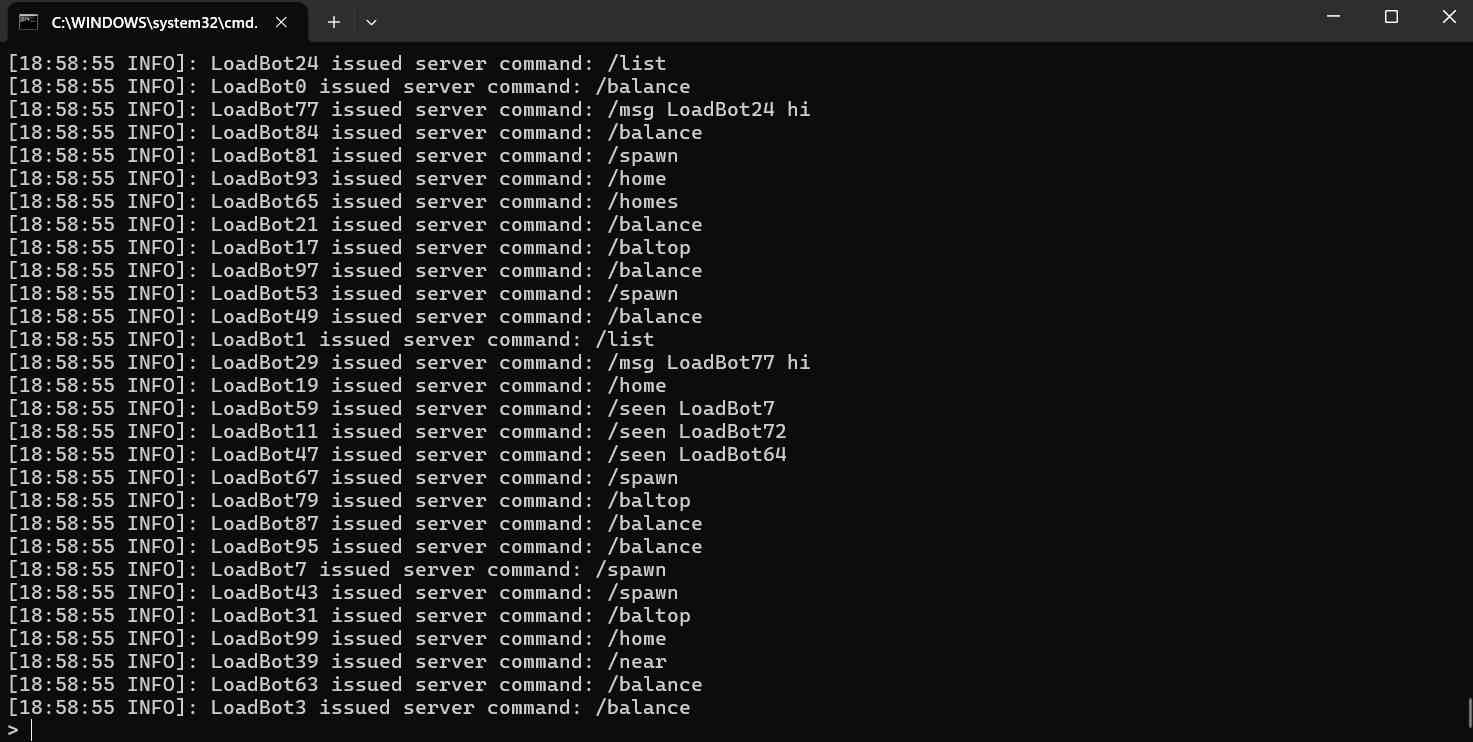
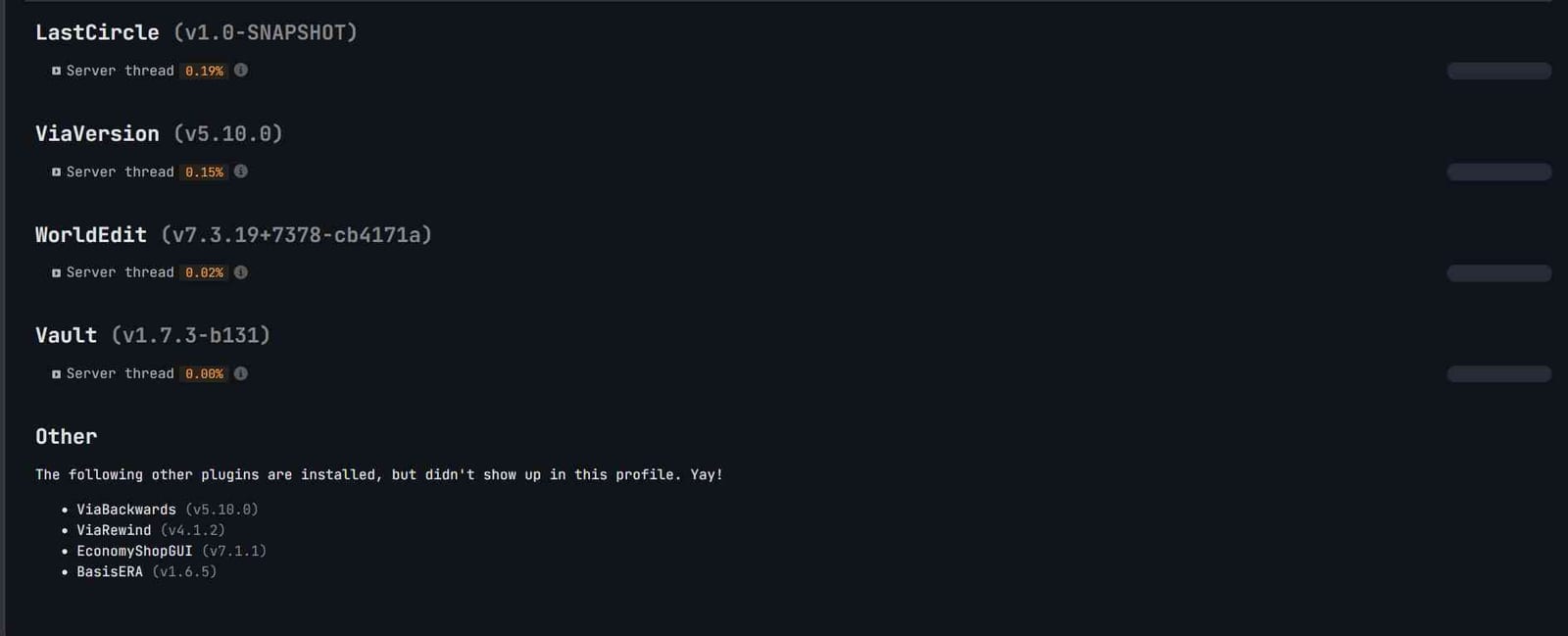
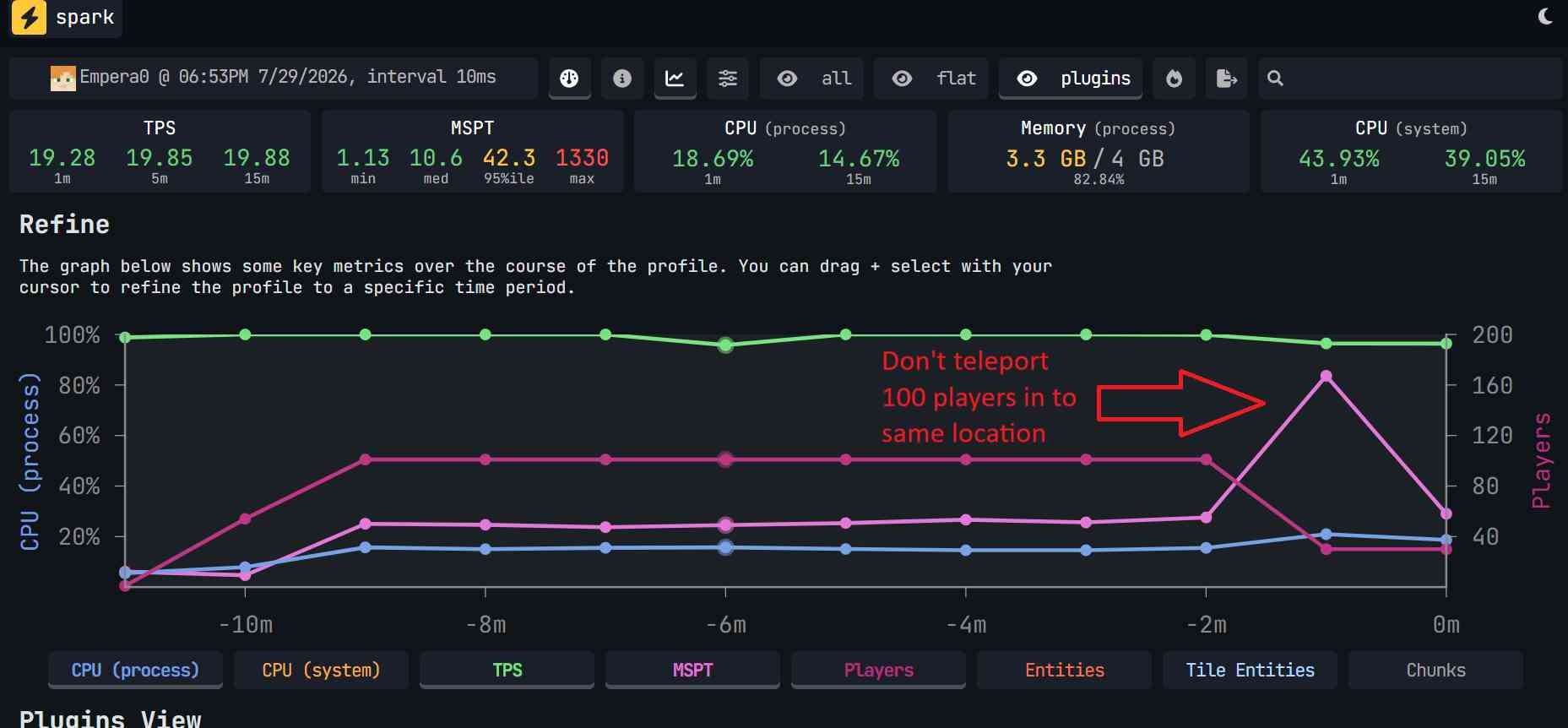
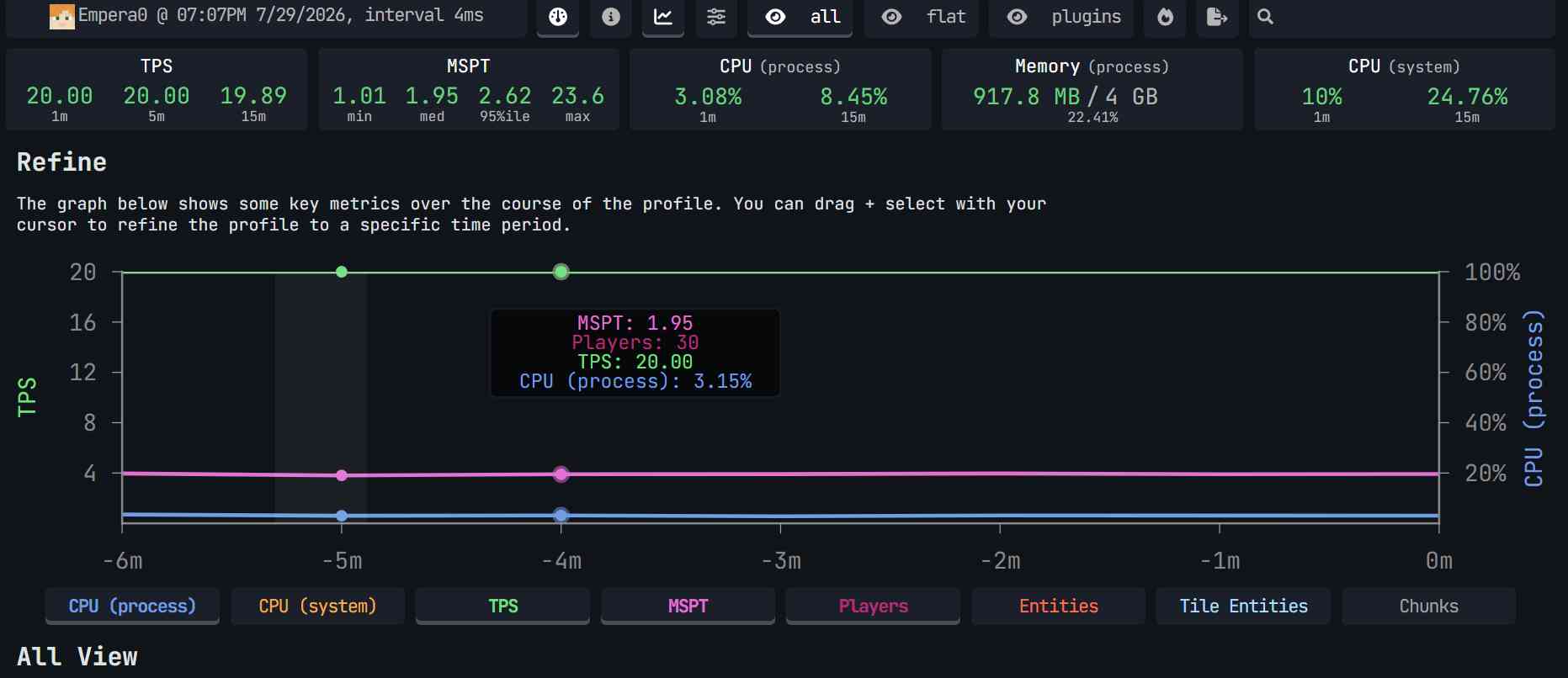
40 - 30 mysql test

-1.jpg)